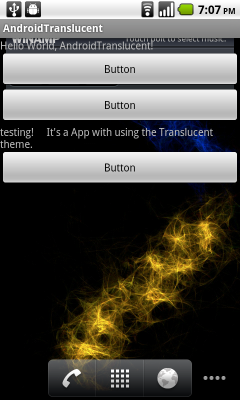
To set background of your app to be transparent, you can use Android pre-defined Theme.Translucent.
Modify AndroidManifest.xml, to add the code inside <activity>
android:theme="@android:style/Theme.Translucent"
example:
Xml file
<?xml version="1.0" encoding="utf-8"?>
<manifest xmlns:android="http://schemas.android.com/apk/res/android"
package="com.AndroidTranslucent"
android:versionCode="1"
android:versionName="1.0">
<uses-sdk android:minSdkVersion="4" />
<application android:icon="@drawable/icon" android:label="@string/app_name">
<activity android:name=".AndroidTranslucent"
android:label="@string/app_name"
android:theme="@android:style/Theme.Translucent">
<intent-filter>
<action android:name="android.intent.action.MAIN" />
<category android:name="android.intent.category.LAUNCHER" />
</intent-filter>
</activity>
</application>
</manifest>

